Double Dose seats mean one student will have two Ignite Reading tutoring sessions in a single day. These sessions can be back-to-back or during separate time blocks, and a student may have different tutors for their different sessions depending on tutor availability.
Step one: Select Students
Just like you select students for standard seats, the selection process for Double Dose seats is the same. You will choose the students you want to put in program regardless of the seat type. The seat count box will show the number of students you have chosen, and you can put the Double Dose students into a second time slot on Complete Student Information.
Step two: Complete Student Information
As soon as you get to Complete Student Information, you will see that all students have one row of information which includes a time slot selection. Adding a second time slot to a student will put them into a Double Dose seat. To add a second time slot for a student, click the 3 vertical dots next to a student’s name and add a time slot.
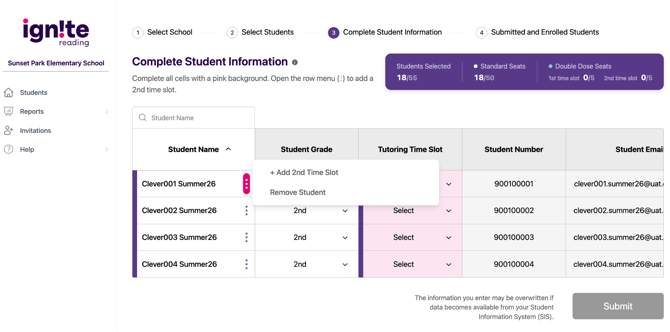
The options under the 3 vertical dots will also include the options to remove a student entirely or remove a time slot for those students who are set up with 2 time slots.
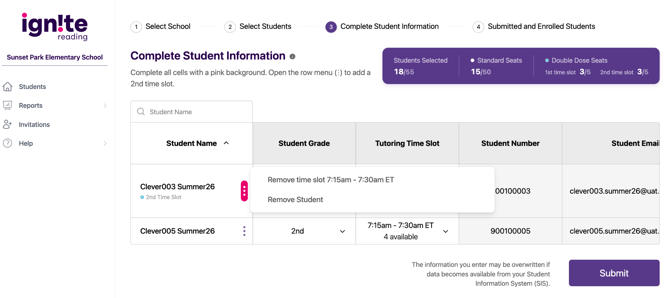
You can distinguish between students in Standards seats versus Double Dose seats by looking at the datagrid. Students in Standard seats have a single row, students in Double Dose seats have a row the height of 2 single rows.
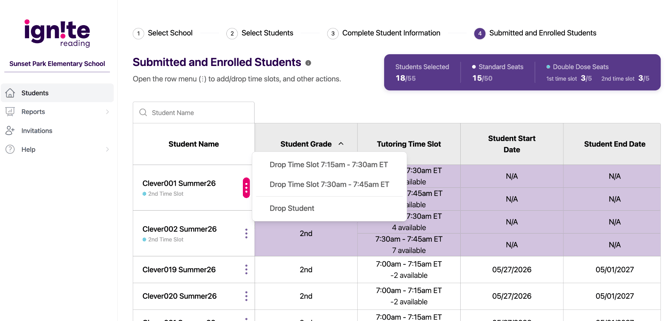
Submitted and Enrolled Students
Once the student is submitted or enrolled, you can still drop a student. In a Double Dose seat, you also have the opportunity to remove a single time slot from a student and add that time slot to another student who is submitted or enrolled.